
To promote a real estate listing on social media, do not rely on one "Just listed" photo dump. Start with one strong vertical listing video, then turn that same listing story into a coming soon post, a just listed Reel, a feature highlight, an open house reminder, and a final update across Instagram, TikTok, YouTube Shorts, Facebook, and email.
If you want to promote a real estate listing on social media consistently, the goal is to reuse one listing story across multiple buyer moments.
The goal is not to create more content from scratch. The goal is to make one listing show up more than once, in formats buyers can notice, watch, and act on.
A listing post is not a file upload. It is a launch moment.
1. Why One Listing Post Is Not Enough
A new listing should not depend on one "Just listed" post.
Most agents already have the raw material: listing photos, property details, neighborhood context, and a few strong selling points. The missed opportunity is usually not the lack of content. It is that those assets are only used once.
A better launch turns the same listing into a small campaign: one anchor video, several post angles, and a few clear CTAs.
That is the difference between posting a listing and promoting a listing.
2. Start With One Listing Story
Before posting, choose the main reason the right buyer would care.
Do not start with only the facts:
- 3 beds
- 2 baths
- 1,850 square feet
- listed at $X
Those details matter, but they are not the hook.
The hook is the buyer-facing story:
- A first home near the train
- A backyard built for summer dinners
- A condo with space for a real desk
- A move-in ready home under a key price point
- A quiet street close to the school buyers want
Once you know the story, every post becomes easier: the video opens stronger, the caption feels more specific, and the CTA has a clearer reason to exist.
3. Create One Anchor Listing Video
Your first asset should be a short vertical listing video.
This becomes the anchor for the entire launch because it can be reused across:
- Instagram Reels
- TikTok
- YouTube Shorts
- Email follow-ups
- Seller updates
- A public listing share page
The video does not need to be long. In most cases, 10 to 20 seconds is enough. Lead with the strongest visual, show the most important spaces, and end with a clear next step.
A good listing video should include strong visuals, clean movement, a buyer-focused hook, social-friendly formatting, and a simple CTA such as "Schedule a showing," "Request more details," or "Book a private tour."
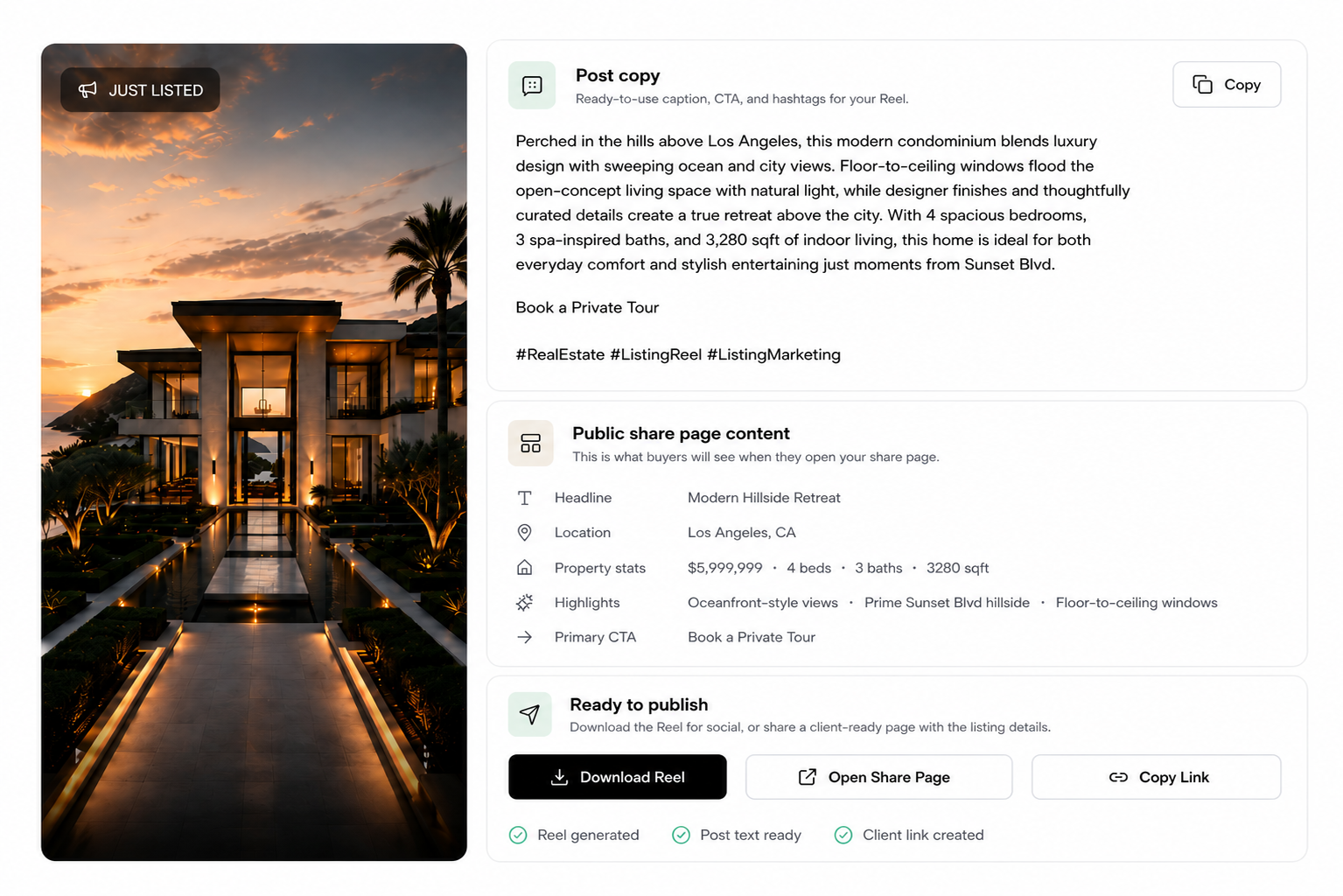
Outlist helps agents create this anchor asset from listing photos. Instead of starting with a blank editor, agents can upload photos and generate a ready-to-post Reel package with the video, caption, CTA, hashtags, and public share page.
Outlist
Create the anchor video first
Outlist turns listing photos into a ready-to-post Reel package for Instagram, TikTok, YouTube Shorts, and your listing share page.
4. Turn the Listing Into a 5-Post Launch Plan
Use this over 7 to 10 days. You do not need five completely different creative ideas. You need five different reasons to bring the same listing back into view.
Post 1: Coming Soon
Goal: build early attention before the listing goes live.
Use this when you want local buyers, neighbors, and past leads to know something is about to hit the market.
Caption angle:
Coming soon in [neighborhood]: a [home type] with [key feature] for buyers who want [buyer benefit].
CTA examples:
- DM for details before it goes live.
- Message me for the first look.
- Request the listing details.
Post 2: Just Listed Video
Goal: announce the listing with motion.
This should be your strongest post. Use the vertical listing video as the main asset and keep the caption direct.
Caption angle:
Just listed in [neighborhood]: [short lifestyle hook].
CTA examples:
- Schedule a showing.
- Request more details.
- DM for details or book a showing.
Post 3: Feature Highlight
Goal: give the listing a second life after the announcement.
Choose one feature only. Do not try to sell the whole home again.
Feature ideas:
- Kitchen
- Backyard
- Primary suite
- Natural light
- Home office
- Location
- Open floor plan
Caption angle:
The best part of this [home type] might be the [feature], especially if you want [buyer benefit].
CTA examples:
- Want to see the rest? Request the full listing.
- Book a private tour.
- Contact the agent for details.
Post 4: Open House Reminder
Goal: turn attention into visits.
This post should be practical, not clever. Mention the timing, location, and reason to come.
Caption angle:
Open house this weekend in [neighborhood]. Come see the [key feature] in person.
CTA examples:
- DM for the open house details.
- Schedule a showing.
- Book a private tour.
Post 5: Final Update or Last Chance
Goal: create urgency without sounding desperate.
Use this when the open house is close, interest is picking up, or the listing has an important update.
Caption angle:
If this home has been on your list, now is the time to take a closer look.
CTA examples:
- Request more details.
- Schedule a showing.
- Contact the agent.
5. How to Adapt the Same Listing for Each Platform
You do not need to remake the listing for every platform. Use the same core video, then adjust the hook, caption, and CTA.
Instagram Reels
Instagram works well for polished listing videos, local visibility, seller sharing, and agent brand building.
Use:
- A clean vertical video
- A location tag
- A short caption
- A CTA that invites DMs or showing requests
Example CTA:
DM for details or book a showing.
TikTok
TikTok works best when the first second is clear. Do not make the video feel too polished or corporate. Start with the strongest room, view, or buyer hook.
Example hooks:
- This just listed in [city].
- A [price point] home with this backyard.
- Would you live here?
Example CTA:
Comment TOUR for the details.
YouTube Shorts
YouTube Shorts can give listing videos a longer shelf life because people may search by city, neighborhood, or property type.
Use searchable titles such as:
- Home for sale in [city]: [key feature]
- Just listed in [neighborhood]: [home type]
- [City] real estate: [buyer benefit]
Example CTA:
Request more details or schedule a showing.
Facebook still matters for local networks, sellers, neighbors, and community sharing. It is especially useful when the listing may be shared in local groups or by the seller's network.
Use a direct caption and make the post easy to understand without extra context.
Example CTA:
Message me for the full listing or open house details.
6. Caption and CTA Examples to Promote a Real Estate Listing on Social Media
Caption formulas:
- Just listed in [neighborhood]: [key feature] for buyers who want [buyer benefit].
- Coming soon: a [home type] near [local landmark or area].
- If you want [lifestyle], this [home type] in [area] is worth a look.
- The best part of this home is not just [feature]. It is [benefit].
- For buyers looking under [price point], this one solves [buyer pain].
CTA formulas:
- DM for details or book a showing.
- Schedule a showing.
- Request more details.
- Book a private tour.
- Contact the agent.
- Comment TOUR and I will send the listing.
- Message me for the open house details.
The best CTA depends on the stage of the launch. Early posts can ask for DMs. Just listed posts should invite showing requests. Open house posts should make the next step very specific.
Outlist
Turn one listing into a full launch package
Outlist creates the listing Reel, caption, CTA, hashtags, and public share page from your photos, so you can promote the same listing across Instagram, TikTok, YouTube Shorts, email, and seller updates.
FAQ
What is the best way to promote a real estate listing on social media?
The best way to promote a real estate listing on social media is to turn the listing into a small launch campaign, not a single post. Start with one vertical listing video, then reuse the same listing story across a coming soon post, just listed post, feature highlight, open house reminder, and final update.
Can I promote a real estate listing if I only have photos?
Yes. Listing photos are enough to create a short real estate video if you choose the strongest 6 to 9 images, lead with the best visual, add a buyer-focused hook, and end with a clear CTA. The video does not need to feel cinematic. It needs to make the property easy to understand and act on.
Do I need a different video for Instagram, TikTok, and YouTube Shorts?
No. You can start with one vertical listing video and adjust the caption, hook, and CTA for each platform. The core property video can stay the same.
What is the best CTA for a real estate listing post?
Use a CTA that matches the buyer's intent. Good options include "Schedule a showing," "Request more details," "Book a private tour," "Contact the agent," or "DM for details or book a showing."
How do I promote a new real estate listing on social media?
To promote a real estate listing on social media well, start with one anchor video, then reuse it across a coming soon post, just listed announcement, feature highlight, open house reminder, and final update.
The AI real estate video generator is the commercial starting point when you want that anchor Reel and its supporting copy created from one listing brief.
How often should I post a listing?
A new listing can usually support 5 posts: coming soon, just listed, feature highlight, open house reminder, and update or last-chance post.
What should a Just Listed video include?
Lead with the strongest property visual, show the verified location or neighborhood, keep the listing story focused on one buyer benefit, and end with a showing or details CTA. Use the real estate listing video generator when you want the Reel and share page connected to the same listing.
Can I reuse the listing video for an open house or price drop?
Yes. Keep the property photos and core story, then change the message, verified event details or price, and CTA. The real estate video templates page explains how Just Listed, Open House, Price Drop, and Luxury Listing moments should differ.
The Bottom Line
Promoting a new listing on social media should not feel like a separate creative project.
Start with the assets you already have: listing photos, property details, and the strongest buyer hook. Turn them into one short vertical video, then reuse that video across a coming soon post, just listed announcement, feature highlight, open house reminder, and final update.
The best listing launch is not one post. It is a simple repeatable system.
Outlist
Build the launch package before the listing goes quiet
Outlist creates the anchor Reel, caption, CTA, hashtags, and share page from your photos so every listing can launch with more than one post.
Related Reads
- Real estate social media: why photo dumps do not turn listings into leads
- Open house Facebook post ideas that get more attention
- Real estate post ideas for Instagram beyond Just Listed posts
- How to create a real estate listing video from photos
- Turn real estate photos into social-ready videos
- Real estate video ideas that start better conversations
- Best AI video generator for real estate agents
- AI real estate video makers compared
- Outlist vs Canva for real estate videos
- How to make property videos without editing skills
- Real estate video templates for listing moments
- Turn real estate photos into video
- AI real estate video generator
- Learn what Outlist is
- Outlist features for listing video marketing