
You can create real estate videos from listing photos by choosing 6 to 9 strong property images, arranging them like a short buyer tour, generating a vertical video, and pairing it with a clear caption and call to action.
A real estate listing video from photos works because the listing already has the visuals buyers need to understand the home quickly.
For most agents, the problem is not a lack of visuals. The photos already exist. The problem is that turning those photos into a polished listing video usually requires editing software, a freelancer, or extra time during an already busy launch.
A better workflow starts with the listing photos you already have and turns them into a ready-to-post video package for Instagram Reels, TikTok, YouTube Shorts, email, and a public listing share page.
Why a Real Estate Listing Video From Photos Works
Listing photos are already selected to sell the home.
They usually show the best angles, strongest rooms, natural flow, and most important features. A good listing video does not need to replace those photos. It needs to give them motion, pacing, and a clear next step.
This matters because buyers do not browse Instagram, TikTok, or YouTube Shorts the same way they browse an MLS gallery. On social media, the video has to earn attention quickly. Motion gets the first second. The property story earns the next few seconds.
The best photo-based listing videos do three things:
- Show the strongest visuals first.
- Move through the home in a logical order.
- End with a buyer action, such as requesting details or booking a showing.
The Real Estate Listing Video From Photos Workflow
1. Choose 6 to 9 photos that tell a short tour
You do not need every image from the listing folder. A short listing video works better when each photo has time to register.
For a 15-second video, 6 to 9 photos is usually enough:
- Front exterior
- Main living space
- Kitchen
- Dining area or open layout
- Primary bedroom
- Primary bathroom
- Backyard, patio, pool, or view
- One detail shot
- Neighborhood or amenity image, if relevant
The goal is not to show the entire home. The goal is to make the right buyer want the next step.
2. Put the strongest image first
The first image should not always be the first MLS photo.
For social video, start with the image most likely to stop the scroll. That might be the front exterior, but it might also be a bright kitchen, a pool, a view, a dramatic living room, or a backyard that immediately communicates lifestyle.
MLS order is built for browsing. Social video order is built for attention.
3. Arrange the photos like a buyer tour
A simple order works best:
- Exterior or strongest hook
- Main living area
- Kitchen
- Dining or entertaining space
- Primary bedroom
- Bathroom
- Outdoor space or view
- Final lifestyle detail
This creates a short tour that feels natural without trying to show every room.
If the home has one standout feature, do not bury it. Show it early, then use the rest of the video to support the story.
4. Keep the video short
For most agents, a real estate listing video from photos should stay between 10 and 20 seconds. Outlist uses 15 seconds as a strong default because it gives the video enough time to show the property without making the viewer wait.
The video has one job: create enough interest for the next action. It does not need to replace the full listing page, MLS gallery, or private showing.
5. Pair the video with a buyer-focused caption
A generic caption says:
New listing. 3 bed, 2 bath. Message me for details.
A better caption says:
A quiet backyard, an updated kitchen, and room to work from home. This new listing in [city] is built for the buyer who wants space without leaving the neighborhood.
A good caption should include:
- The main buyer benefit
- The location or neighborhood
- One or two memorable details
- A clear next step
This turns the video from a visual asset into a listing marketing post.
6. Use one clear CTA
Do not make people guess what to do next.
Use one clear call to action:
- DM for details or book a showing.
- Schedule a showing.
- Request more details.
- Book a private tour.
- Contact the agent.
- Comment TOUR and I'll send the details.
The best CTA depends on where the post is used. For Instagram or TikTok, a DM-based CTA can work well. For a public share page, "Schedule a Showing" or "Request More Details" is clearer.
Outlist
Turn listing photos into a ready-to-post Reel
Upload 6 to 9 property photos. Outlist creates a short vertical listing video, post copy, and public share page.
How Outlist Makes a Real Estate Listing Video From Photos Easier
Outlist was built for agents who already have listing photos but do not want to turn every real estate listing video from photos into an editing project.
Instead of opening a video editor, choosing transitions, resizing for each platform, writing captions, and building a separate page, you start with the property photos.
Outlist helps create:
- A short vertical listing Reel
- A post-ready caption
- A clear CTA
- Relevant hashtags
- A public share page for the listing
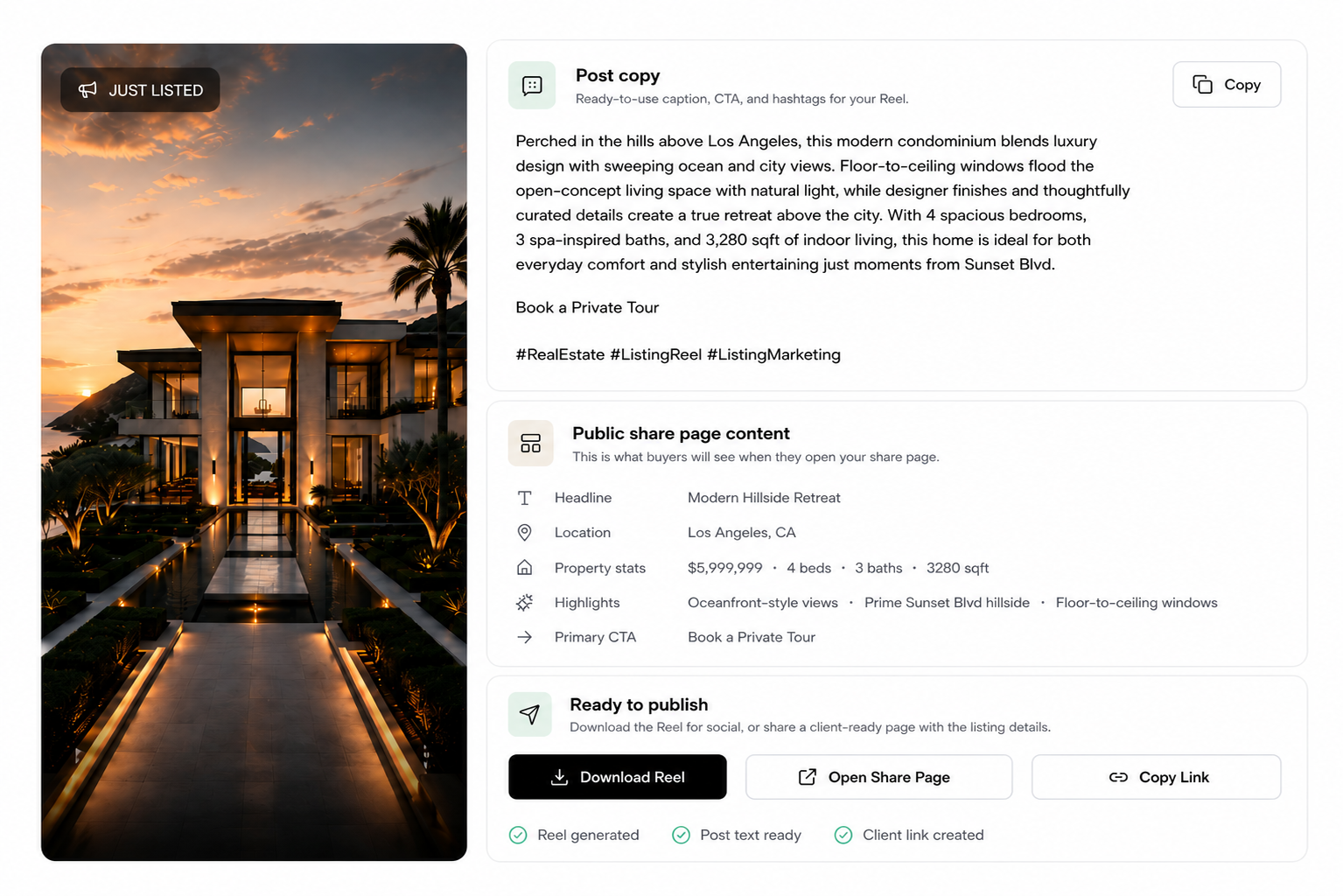
That means one listing can become a social-ready marketing package, not just a video file.
A Reusable Photo-to-Video Checklist
Use this for every new listing:
- Select 6 to 9 strong photos.
- Put the strongest visual first.
- Arrange the photos like a short buyer tour.
- Generate a 10 to 20 second vertical video.
- Write one buyer-focused caption.
- Add one clear CTA.
- Publish to Instagram Reels.
- Reuse the video on TikTok and YouTube Shorts.
- Add the video to a public listing share page.
- Send the video or share page to the seller.
- Use the video again for an open house reminder or feature highlight.
Repeatability is the point. The more predictable the workflow becomes, the easier it is to give every listing a stronger launch.
Outlist
Make every listing easier to launch
Outlist turns listing photos into a Reel package with the video, post copy, and public share page, so agents can promote listings without rebuilding the process each time.
FAQ
Can I make a real estate video from listing photos?
Yes. Listing photos can be used to create a short property video for Instagram Reels, TikTok, YouTube Shorts, Facebook, email, seller updates, and listing share pages.
How many photos should I use in a real estate listing video from photos?
For a 15-second real estate listing video from photos, 6 to 9 photos is usually enough. This gives each image enough time to be seen without making the video feel too slow.
How long should a listing video from photos be?
Most photo-based listing videos should be around 10 to 20 seconds. Outlist uses 15 seconds as a strong default for short-form listing videos.
What photos should I include in a listing video?
Use photos that create a simple buyer tour: exterior, living space, kitchen, dining area, primary bedroom, bathroom, outdoor space, and one strong lifestyle or detail shot.
Do I need video footage to create a listing video?
No. You can create a listing video from still photos if the photos are high quality and arranged in a clear order. Motion, pacing, and captioning can make the photo-based video feel native to social media.
What should I include in the caption?
Include the main buyer benefit, the location, one or two memorable property details, and a clear CTA such as "Schedule a showing," "Request more details," or "Book a private tour."
The Bottom Line
You do not need to wait for a full video shoot to market a listing with video.
If you already have listing photos, you already have the raw material for a short social-ready listing video. Choose the strongest images, arrange them like a buyer tour, add a clear caption and CTA, and reuse the result across your launch channels.
The best real estate listing video from photos workflow does not make agents become video editors. It turns the photos they already have into a repeatable listing marketing package.
Outlist
Create the listing video before the launch window closes
Upload 6 to 9 listing photos and let Outlist generate the Reel, post copy, and share page for your next listing.
Related Reads
- Real estate social media: why photo dumps do not turn listings into leads
- Open house Facebook post ideas that get more attention
- Best AI video generator for real estate agents
- AI real estate video makers compared
- Outlist vs Animoto for listing videos
- Real estate video ideas for agents with only listing photos
- Turn real estate photos into social-ready videos
- How to promote a new listing on social media
- How to make property videos without editing skills
- Real estate listing video generator
- Learn what Outlist is
- Outlist features for listing video marketing